Mobile App 1.22.4 Release Notes
- October 15, 2026
- ServeManager
Today we released Version 1.22.4 for the ServeManager Mobile App
This release is about GPS that can be trusted. Until now, an attempt or photo could carry an old location from where the server had been, not where they were standing. The app now takes a fresh reading when it matters, checks it, tells the server how to fix a bad one, and refuses faked locations. Anyone can now open a photo and see the GPS saved inside it. One Legal and ITX photos that fail to upload can only be re-sent as the original, never swapped. This is also the new minimum version: every server must be on 1.22.4 to keep using the app.
Why This Release Matters
- Every server must be on this version. The minimum version is now 1.22.4. Anyone on an older app must update from the store before they can keep working, so the GPS fixes below reach every server. Nothing on their phone is lost.
- Attempt GPS shows where the server actually was. The app no longer locks an attempt with a location that is minutes old. This means fewer wrong coordinates on affidavits and fewer client disputes.
- Every photo carries its own fresh GPS. The app takes a new reading the moment the shutter is tapped and saves it inside the photo. If the photo was taken somewhere else, the attempt GPS is updated or the server is asked.
- Servers know when their GPS is bad and how to fix it. Weak signal, Precise Location off, moving, or an old reading each get a short message with the fix.
- Faked locations are refused. If a "fake GPS" app is supplying the location, the app will not lock it.
- Anyone can check a photo's GPS. A new Photo Info panel shows where and when a photo was taken, how accurate the reading was, and how far it was from the service address.
- One Legal and ITX photos stay camera-only through a retry. A failed upload can only be re-sent as the original file. It can no longer be replaced with a different photo.
GPS accuracy
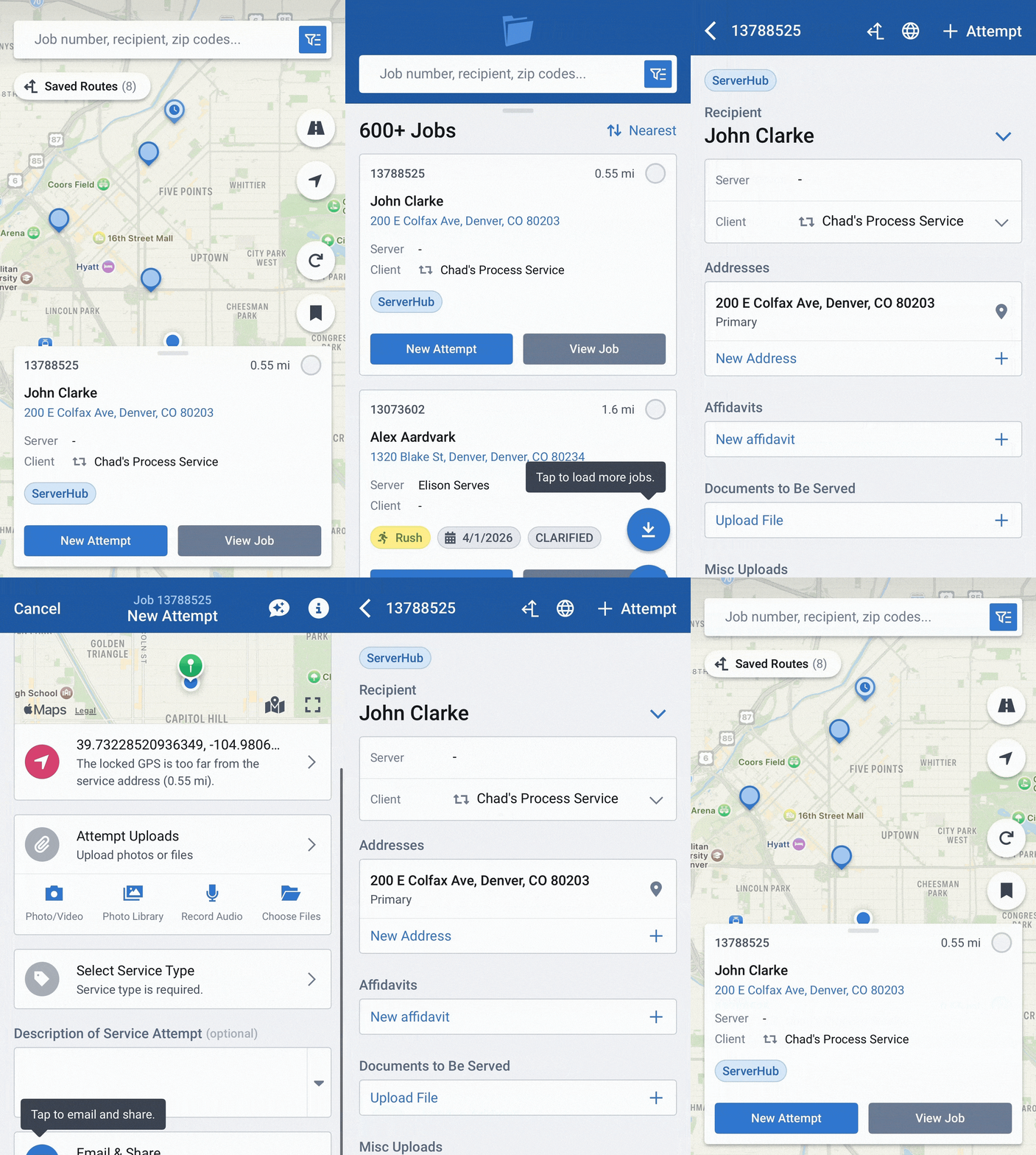
No more old GPS on new attempts
What servers see
- When there is no good reading yet, the GPS field says Tap to lock GPS.
- The location sheet shows the time the GPS was locked.
Fresh GPS at the moment a photo is taken
GPS starts as soon as the camera opens. When the server taps the shutter, the app takes a new reading and saves it inside the photo. It then compares it with the attempt's GPS.
- Within 50 m of the attempt GPS: nothing changes.
- More than 50 m away and the attempt GPS was set by the app: it is replaced with the photo's reading.
- More than 50 m away and the server locked the GPS themselves: the app asks Update Attempt GPS? with Use Photo GPS or Keep Current.
- If the app cannot confirm a fresh reading, the server is told to move and take another photo.
GPS quality checks and warnings
Every reading is checked before it is used. If a check fails, the server sees a short message telling them what to do.
- Weak signal: go outside or near a window, turn on Wi-Fi or data.
- Precise Location off: turn it on. Tapping the message opens Settings.
- Moving: stop at the address before locking.
- Old reading: update GPS for the current spot.
- Fake location app: the reading is refused until the app is turned off.
After the GPS is locked
- The attempt's GPS tile lists any problems with the locked reading in red. For example, "GPS accuracy was low" or "GPS was too far from the service address".
Photo accuracy kept on Android
New: Photo Info
See the GPS saved inside any photo
A new info button on any photo opens a Photo Info panel. It reads the GPS saved inside the photo file and shows it in plain language, with a map of the photo's spot and the attempt address.
- Where the photo was taken, and the time with its time zone.
- How accurate the reading was, and how fast the phone was moving.
- Straight-line distance to the service address.
- Quick labels such as At the address, Too far, Weak signal or Moving.
- If the photo has no GPS saved, it says so.
One Legal and ITX
Failed uploads can only be re-sent as the original
When an attempt photo failed to upload, the retry screen let the server replace it with a new camera photo or an audio recording. On partner jobs, that meant a different photo could be sent in place of the one that failed. Now the retry screen on these jobs offers only two choices: re-send the original file, or download it.
- If the original is no longer on the phone, the server sees Original File Unavailable. It tells them to upload the photo on ServeManager web and add a reason.
- Retries on all other jobs work as before.
FAQ's
- App refuses to open and asks for an update. This is expected for anyone below 1.22.4. Their work is safe. They should update from the store.
- "It says my GPS is over 5 minutes old." This is expected. The server should tap to update GPS at their current spot.
- "Weak GPS signal" or "Precise Location is off." The server should follow the message. For Precise Location, tapping the message opens Settings.
- "Mock location detected" and GPS will not lock. A fake GPS app is running on the phone. The server must turn it off. This is on purpose.
- The app asked whether to use the photo's GPS. This is expected when a photo is taken more than 50 m from GPS the server locked themselves.
- Red lines under the GPS on an attempt. These list problems with the locked reading. The server can update GPS to clear them.
- Distances to jobs are blank for a moment after opening the app. This is expected if the app was closed for more than 10 minutes. The old location is thrown away and a fresh one loads within seconds.
- No camera or library option when retrying a failed upload on a One Legal or ITX job. This is expected. The server can re-send the original, or upload it on ServeManager web with a reason if the original is gone.
Please contact us if you have any questions